

Professional ECU remapping requires more than a general diagnostic scanner. The equipment must communicate with engine and transmission control units, follow the correct vehicle procedure and transfer calibration files reliably.
The right setup depends on the vehicles that arrive at the workshop. A business working mainly on late-model dual-cab utes may see a different protocol mix from one handling European performance cars or motorcycles. Some jobs stay at the diagnostic port. Others put the ECU on the bench or require circuit-board access.
Alientech’s global directory lists Alientech Australia as its Australian branch, with local support for KESS3 and the wider product range. Our team helps workshops confirm tool suitability and vehicle coverage before equipment is selected.
TLDR
Professional ECU remapping hardware reads or obtains control-unit data and writes prepared files through a supported protocol. KESS3 provides OBD access alongside Bench and Boot modes, while ECM Titanium handles calibration work and Powergate supports managed file delivery to compatible customer devices.
What Professional ECU Remapping Tools Do
An ECU remapping tool connects the workshop computer to the vehicle control unit. It identifies the ECU or TCU and transfers the required file data. After calibration, it writes the prepared file back through the selected protocol.
Calibration software has a separate job. The programming tool handles communication and file transfer; the calibration software is where the technician examines and modifies the file. Mixing those roles is a common source of confusion when a workshop first compares remapping products.
A professional tool also supplies vehicle-specific protocols and operating instructions. Control units do not share one universal connection procedure. The instructions on screen matter.
ECU Reading and Writing in a Workshop Workflow
Start with identification. The vehicle details, ECU part number and software version need to agree with the protocol selected in the tool. Stable power and the correct cable matter throughout the operation.
The original ECU or TCU data is then read or obtained using the specified method. Save it before any calibration work begins. A file called original.bin tells the next technician very little; JOB-1842_Ranger_PX3_ORI.bin ties the file to a real workshop record.
Once the modified file is ready, the technician returns to the programming tool and follows the writing procedure. After programming, the workshop checks for fault codes and assesses the vehicle under its normal test process. Every result belongs against the exact file revision that was written.
The KESS3 tuning tool is designed for this programming role. It provides OBD access alongside Bench and Boot modes in one device, which allows a workshop to handle different control-unit requirements without changing between separate programming platforms.
OBD ECU Remapping Tools
OBD programming communicates through the vehicle’s diagnostic port, so the ECU stays in the vehicle. For a routine supported job, that saves removal time and keeps the work bay moving.
Preparation still matters. Confirm compatibility, follow the supplied instructions and connect suitable battery support before the write begins. A laptop update, loose diagnostic plug or voltage drop can turn a straightforward booking into a recovery job.
OBD access varies by vehicle and control unit. A workshop should check the exact protocol rather than assume that every vehicle with a diagnostic socket supports the same functions.
Bench ECU Programming
Bench mode connects to the control unit after it has been removed from the vehicle. The ECU case generally remains closed, while the tool connects through the external connector using the specified wiring arrangement.
Bench mode gives the workshop another route when the required operation is unavailable through OBD. The tool communicates directly with the ECU or TCU, so correct pin selection and a stable power supply are essential.
Give Bench work its own clean programming area. Label the harness, photograph the connector position before power is applied and keep the job sheet beside the unit. Those small habits prevent expensive mix-ups during a busy week.
Boot Mode ECU Programming
Boot mode provides deeper access to supported control units. It usually requires the ECU to be opened so the technician can connect at circuit-board level according to the specific procedure.
Workshops use Boot mode for advanced programming and legitimate repair work. Supported tasks include recovery after an interrupted programming operation and data transfer to a replacement unit. Direct access to electronic components leaves little room for guesswork, so the connection diagram must be followed exactly.
Boot capability expands the jobs a remapping workshop can assess, but capability alone should not decide the method. The selected protocol and official operating instructions should guide every connection.
Choosing ECU Remapping Equipment for Your Workshop
Vehicle coverage is the first practical consideration. Pull a sample from recent bookings and check those exact vehicles and control units. A broad compatibility number is less useful than knowing the workshop’s regular utes, vans or motorcycles are covered by the required protocols.
Next, look at access modes. OBD covers many workshop jobs. Bench and Boot extend the range when direct control-unit access is required, and one device across those modes means fewer interfaces for technicians to learn.
Daily usability deserves equal weight. Technicians need clear vehicle selection, current protocol information and connection instructions they can follow at the bay or bench. New protocol releases also affect the jobs the workshop can accept next month, not only the vehicle list shown on purchase day.
Workshops should also consider the relationship between the programming tool and the rest of the tuning process. Hardware and calibration software need to support clear file records within one practical system.
How KESS3 and ECU Tuning Software Work Together
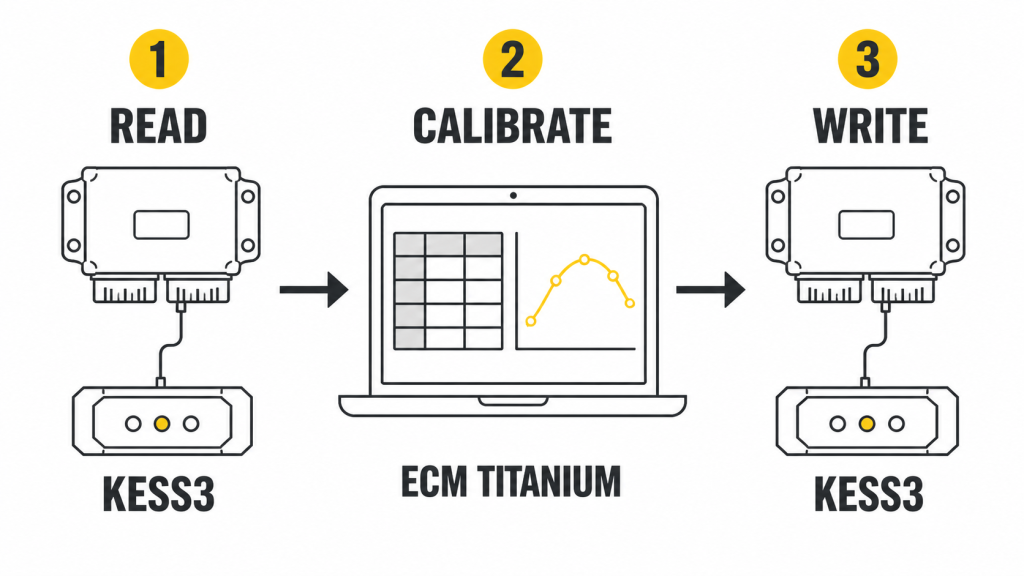
KESS3 handles communication with the ECU or TCU. After the original file has been read or obtained, ECM Titanium tuning software can be used to examine the calibration file and prepare changes. The completed file then returns to KESS3 for writing through the supported connection method.
The product split is simple. KESS3 manages vehicle access and programming. ECM Titanium supports calibration through its Drivers and map views. The job record connects both stages to the correct vehicle.
Technicians developing a broader workflow can also use the workshop guide to ECU remapping as an introduction to the equipment and processes involved.
Extending Remapping Services with Powergate
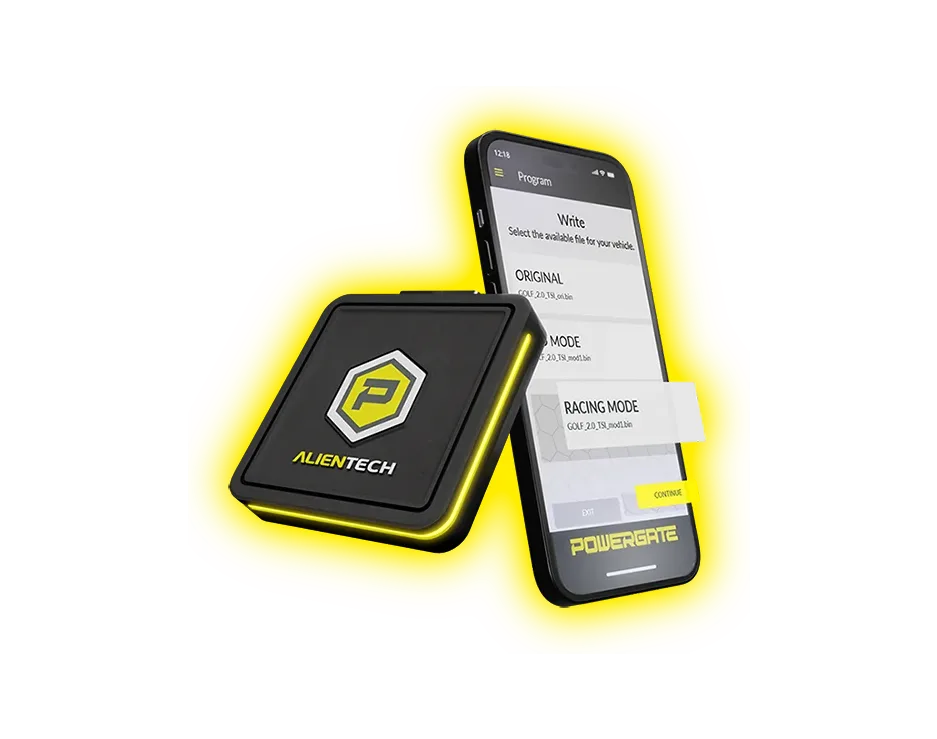
Powergate pairs the customer device with a mobile app for managed file delivery.
Some workshops want customers to apply approved files without returning the vehicle for every programming session. Powergate supports this model for compatible cars and motorcycles through an OBD-connected device and mobile app.
The workshop remains responsible for every file offered to a customer. Powergate provides the delivery channel and its dashboard manages devices and files. KESS3 remains the workshop programming tool.
Powergate suits businesses planning a managed remote service. Workshops focused entirely on vehicles present in the workshop may place greater priority on OBD access with Bench and Boot capability.
Building a Reliable ECU Remapping Setup
A professional setup starts with controlled procedures. Confirm vehicle identification before connecting. Preserve the original file. Use suitable battery support and stop Windows updates or sleep settings from interrupting the programming computer mid-job.
File control deserves the same attention as the physical connection. Every modified file must trace back to its original and job record. Six months later, the workshop should be able to identify exactly what was written without searching through email attachments or guessing from a filename.
Workshop policy should define which technicians can perform each access method. OBD work and opened-ECU Boot work carry different handling requirements, so the process should reflect the level of access involved.
Discuss Your Workshop Setup
Alientech Tools Australia can check the vehicles your workshop services against current KESS3 coverage and available protocols. Contact the team to discuss the programming access your workload requires and how calibration software could fit the setup.
ECU Remapping Tool FAQs
What Is the Difference Between OBD, Bench and Boot Programming?
OBD uses the vehicle’s diagnostic port. Bench connects to a removed control unit through its external connector. Boot generally requires the unit to be opened for circuit-board access. The protocol tells the technician which route applies.
Do Workshops Need Separate Hardware and Software for ECU Remapping?
Yes. KESS3 handles control-unit communication and file transfer. ECM Titanium is where the calibration file is examined and modified.
Can One ECU Tool Work with Cars and Other Vehicle Types?
Yes, provided the activation and protocol cover the exact control unit. Check the current vehicle list before accepting an unfamiliar job.
How Does Powergate Fit a Workshop Remapping Service?
Powergate gives a compatible customer vehicle access to files managed by the workshop. The customer uses an OBD-connected device and mobile app; the workshop controls the files supplied through the system.
What Should a Workshop Check Before Programming with KESS3?
Match the vehicle and control-unit identification to the KESS3 protocol first. Read the procedure before connecting, then maintain suitable power for the entire operation. Save the original against the job number before a modified file goes anywhere near the vehicle.